19,516
Stars
758
Forks
197
Watchers
2
Open Issues
MIT
许可证
Shell
语言
2011-01-05
创建时间
2026-10-18
最近更新
项目能做什么
极简好用的 Node.js 多版本管理工具。
来源:基于仓库元数据
· 内容以仓库实际 README 为准
使用说明 查看原始 README 原仓库文档
中文使用说明暂未生成。下面保留原仓库 README 摘录,命令与配置均以原文为准。
原始 README 摘录(英文原文,节选前 3000 字符)
# `n` – Interactively Manage Your Node.js Versions
[](https://www.npmjs.com/package/n)
[](https://www.npmjs.com/package/n)
[](https://www.npmjs.com/package/n)
[](https://www.npmjs.com/package/n)
Node.js version management: no subshells, no profile setup, no convoluted API, just **simple**.
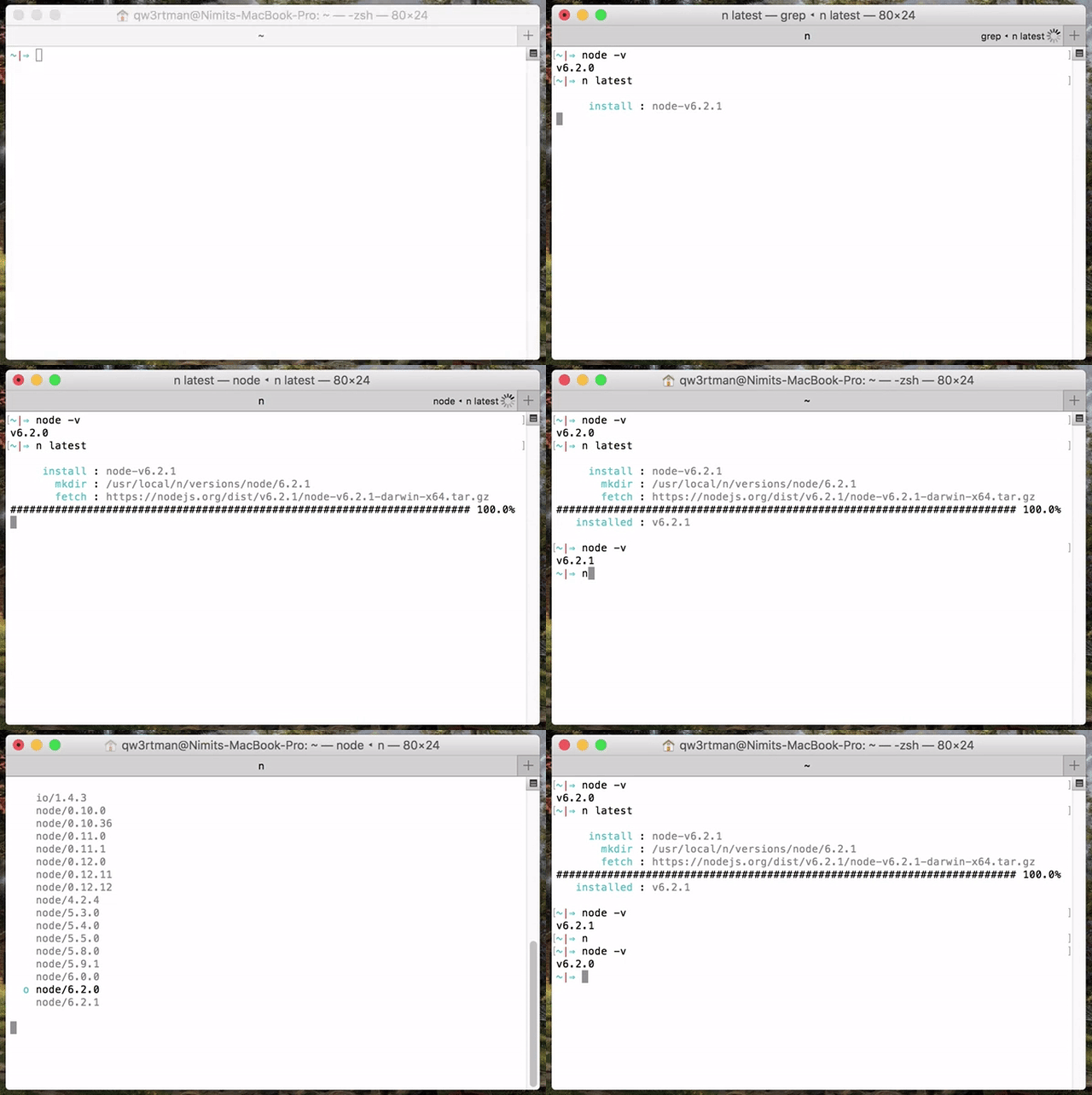
- [`n` – Interactively Manage Your Node.js Versions](#n--interactively-manage-your-nodejs-versions)
- [Supported Platforms](#supported-platforms)
- [Installation](#installation)
- [Third Party Installers](#third-party-installers)
- [Replacing a previous node install](#replacing-a-previous-node-install)
- [Installing Node.js Versions](#installing-nodejs-versions)
- [Specifying Node.js Versions](#specifying-nodejs-versions)
- [Removing Versions](#removing-versions)
- [Using Downloaded Node.js Versions Without Reinstalling](#using-downloaded-nodejs-versions-without-reinstalling)
- [Preserving npm](#preserving-npm)
- [Miscellaneous](#miscellaneous)
- [Custom Mirror](#custom-mirror)
- [Custom Architecture](#custom-architecture)
- [Optional Environment Variables](#optional-environment-variables)
- [How It Works](#how-it-works)
## Supported Platforms
`n` is supported on macOS, Linux, including with Windows Subsystem for Linux, and various other unix-like systems.
It is written as a BASH script but does not require you to use BASH as your command shell.
`n` does not work in native shells on Microsoft Windows (like PowerShell), or Git for Windows BASH, or with the Cygwin DLL.
## Installation
If you already have Node.js installed, an easy way to install `n` is using `npm`:
npm install -g n
The default root location used when running `n` is `/usr/local` where a normal user does not have write permission. You may strike the same sort of permission error when using npm to install global modules, like the above command. You have three main options:
1) change the ownership of the relevant directories to yourself (see below)
2) tell `n` to use a custom location where you do have write permissions (see `N_PREFIX`)
3) put `sudo` in front of the command to run it as super user
`n` caches Node.js versions in subdirectory `n/versions`. The _active_ Node.js version is installed in subdirectories `bin`, `include`, `lib`, and `share`.
To take ownership of the system directories (option 1):
# make cache folder (if missing) and take ownership
sudo mkdir -p /usr/local/n
sudo chown -R $(whoami) /usr/local/n
# make sure the required folders exist (safe to execute even if they already exist)
sudo mkdir -p /usr/local/bin /usr/local/lib /usr/local/include /usr/local/share
# take ownership of Node.js install destination folders
阅读完整原文
商业机会分析 规则生成(AI 未配置)
综合评分 53.7 分。该项目在“个人可实施性”维度得 35 分,“付费可能性”维度得 40.0 分,差异化空间 70.0 分(评分依据见评分卡)。
将 n 改造为垂直场景 SaaS
| 产品构想 | 保留核心能力,针对某一类用户(如某行业团队)做托管版,收取月费。 |
| 目标用户 | 有该需求的中小团队 / 独立站长 |
| 难度/周期 | 较高 · 2~4 周(MVP) |
| 收费模式 | 订阅制(如 ¥29~99/月) |
| 竞争风险 | 需验证付费意愿;注意许可证合规 |
| 依据 | 数据支持的判断:许可证与关键词显示存在商用与付费场景 |
面向细分需求的二次开发产品
| 产品构想 | 基于 n 的核心能力,聚焦一个更窄的场景(如某平台、某行业)做差异化。 |
| 目标用户 | 该细分场景用户 |
| 难度/周期 | 中 · 2~6 周 |
| 收费模式 | 买断制 / 订阅制 / 广告 |
| 竞争风险 | 细分需求规模需验证 |
| 依据 | AI 推测:基于项目主题标签的判断 |
以上为规则引擎基于仓库公开数据生成的参考结论,包含推测成分,不构成投资或创业承诺;配置 AI 后可获得更深入的分析。
报告会保存到 个人中心
竞品与相似项目 GitHub Search 真实检索
| 项目 | 中文简介 | Stars | 语言 |
|---|---|---|---|
| OpenZWave/node-openzwave-shared | 中文介绍暂未生成 OpenZWave addon for Node.js (all versions) including managem |
196 | C++ |
| jettbrains/-L- | 中文介绍暂未生成 W3C Strategic Highlights September 2019 This report was pr |
169 | - |
| RemoteToHome-io/gl-tailscale-fix | 中文介绍暂未生成 Tailscale enhancements for GL.iNet routers - exit node adver |
149 | Shell |
| swati1024/torrents | 中文介绍暂未生成 Skip to content Search… All gists Back to GitHub Sign in S |
107 | - |
| ryuone/nenv | 中文介绍暂未生成 Node Version Management: nenv (based on rbenv) |
51 | Shell |
| wfarr/nodenv | 中文介绍暂未生成 NodeJS version management. You know, for nodes. |
47 | Shell |
以上为通过 GitHub 官方 Search API 检索的相似项目,功能差异与优劣势需进一步人工确认,配置 AI 后可生成对比分析。
项目优势与风险
| 技术成熟度 | 创建于 2011-01-05,近 30 天仍在推送,发布过 62 个 Release |
| 社区活跃 | Star 19,516 / Fork 758 / Issue 2(数据支持,可自行核实) |
| 许可证 | MIT |
| 主要风险 | 上游项目方向可能变化;同赛道竞争者较多(见竞品表);热度与需求不完全等价 |
安装与使用
快速开始(以仓库 README 为准)
git clone https://github.com/tj/n.git
cd n
# 请阅读仓库 README 获取确切安装步骤(依赖、配置、启动命令)
术语说明:Docker=应用容器(把程序和依赖打包运行);API Key=调用外部服务的密钥;Git Clone=把仓库代码下载到本地。常见错误:API Key 未配置 / 端口占用 / 数据库连接失败,多数项目在 README 的 Troubleshooting 章节有说明。