powerlevel10k
55,359
Stars
0
Forks
0
Watchers
0
Open Issues
未知
许可证
Shell
语言
创建时间
最近更新
项目能做什么
一款极速且高度可定制的经典 Zsh 主题。
来源:基于仓库元数据
· 内容以仓库实际 README 为准
使用说明 查看原始 README 原仓库文档
中文使用说明暂未生成。下面保留原仓库 README 摘录,命令与配置均以原文为准。
原始 README 摘录(英文原文,节选前 3000 字符)
# Powerlevel10k
[](
https://gitter.im/powerlevel10k/community?utm_source=badge&utm_medium=badge&utm_campaign=pr-badge)
- **THE PROJECT HAS VERY LIMITED SUPPORT**
- **NO NEW FEATURES ARE IN THE WORKS**
- **MOST BUGS WILL GO UNFIXED**
- **HELP REQUESTS WILL BE IGNORED**
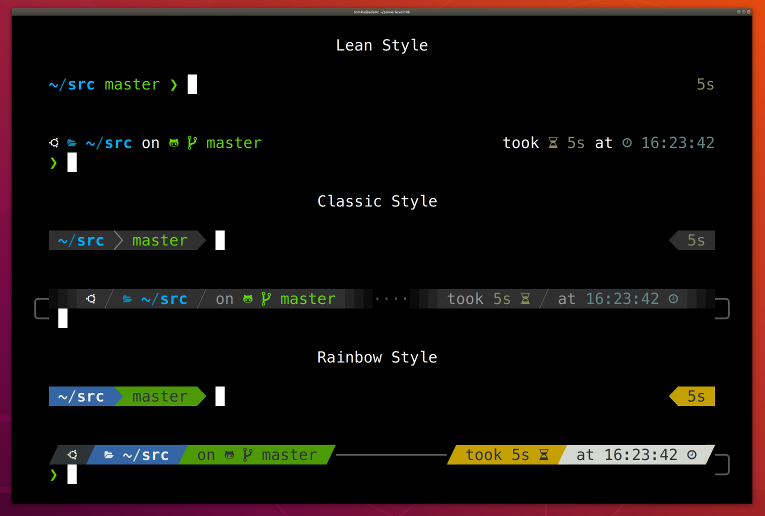
Powerlevel10k is a theme for Zsh. It emphasizes [speed](#uncompromising-performance),
[flexibility](#extremely-customizable) and [out-of-the-box experience](#configuration-wizard).
- [Getting started](#getting-started)
- [Features](#features)
- [Installation](#installation)
- [Configuration](#configuration)
- [Fonts](#fonts)
- [Try it in Docker](#try-it-in-docker)
- [License](#license)
- [FAQ](#faq)
- [Troubleshooting](#troubleshooting)
## Getting started
1. [Install the recommended font](#meslo-nerd-font-patched-for-powerlevel10k). *Optional but highly
recommended.*
1. [Install Powerlevel10k](#installation) itself.
1. Restart Zsh with `exec zsh`.
1. Type `p10k configure` if the configuration wizard doesn't start automatically.
## Features
- [Configuration wizard](#configuration-wizard)
- [Uncompromising performance](#uncompromising-performance)
- [Powerlevel9k compatibility](#powerlevel9k-compatibility)
- [Pure compatibility](#pure-compatibility)
- [Instant prompt](#instant-prompt)
- [Show on command](#show-on-command)
- [Transient prompt](#transient-prompt)
- [Current directory that just works](#current-directory-that-just-works)
- [Extremely customizable](#extremely-customizable)
- [Batteries included](#batteries-included)
- [Extensible](#extensible)
### Configuration wizard
Type `p10k configure` to access the builtin configuration wizard right from your terminal.
<details>
<summary>Screen recording</summary>
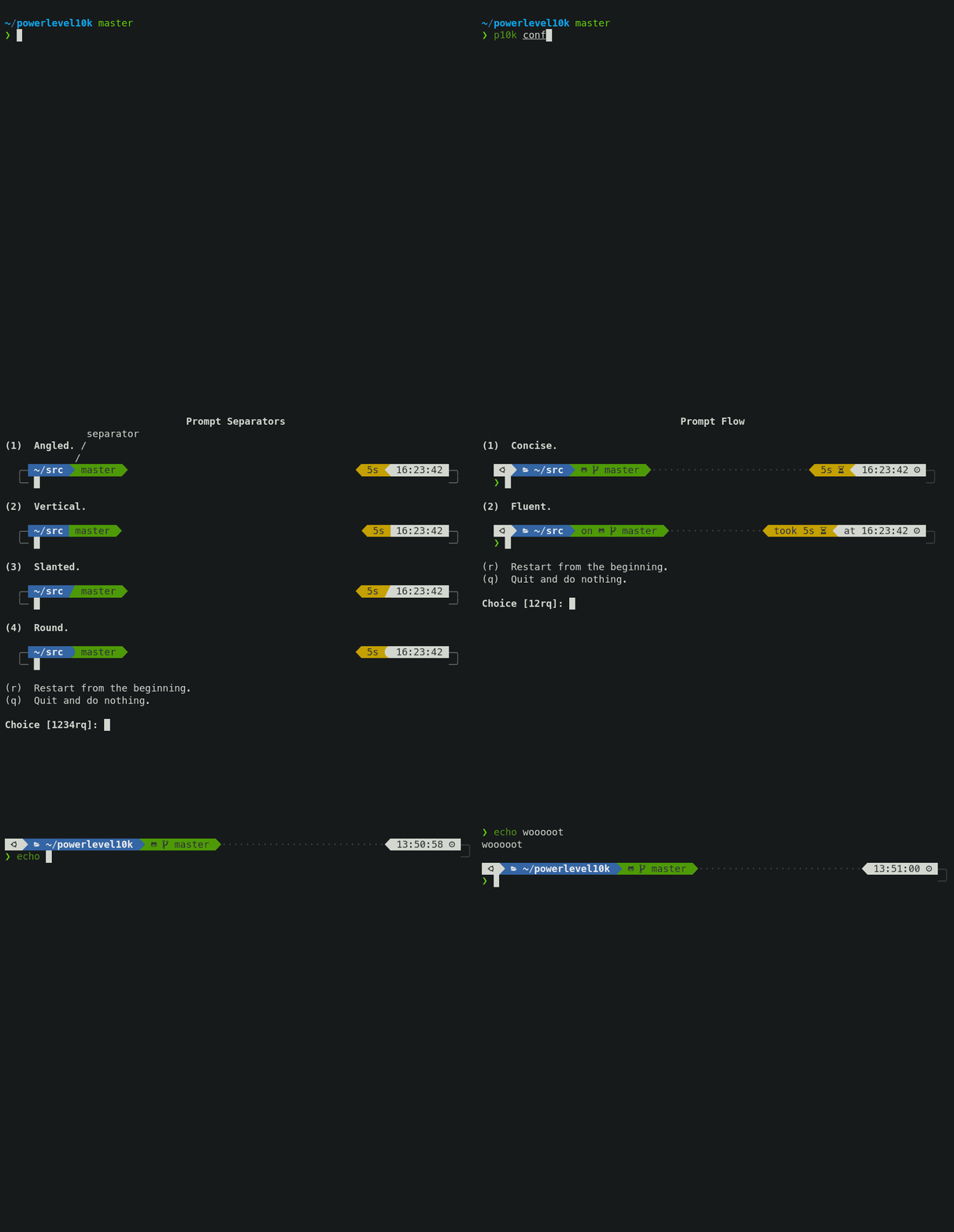
</details>
All styles except [Pure](#pure-compatibility) are functionally equivalent. They display the same
information and differ only in presentation.
Configuration wizard creates `~/.p10k.zsh` based on your preferences. Additional prompt
customization can be done by editing this file. It has plenty of comments to help you navigate
through configuration options.
*Tip*: Install [the recommended font](#meslo-nerd-font-patched-for-powerlevel10k) before
running `p10k configure` to unlock all prompt styles.
*FAQ:*
- [What is the best prompt style in the configuration wizard?](
#what-is-the-best-prompt-style-in-the-configuration-wizard)
- [What do different symbols in Git status mean?](
#what-do-different-symbols-in-git-status-mean)
- [How do I change prompt colors?](#how-do-i-change-prompt-colors)
*Troubleshooting*:
- [Some prompt styles are missing from the configuration wizard](
#some-prompt-styles-are-missing-from-the-co
阅读完整原文
商业机会分析 规则生成(AI 未配置)
综合评分 38.0 分。该项目在“个人可实施性”维度得 35 分,“付费可能性”维度得 20.0 分,差异化空间 40.0 分(评分依据见评分卡)。
面向细分需求的二次开发产品
| 产品构想 | 基于 powerlevel10k 的核心能力,聚焦一个更窄的场景(如某平台、某行业)做差异化。 |
| 目标用户 | 该细分场景用户 |
| 难度/周期 | 中 · 2~6 周 |
| 收费模式 | 买断制 / 订阅制 / 广告 |
| 竞争风险 | 细分需求规模需验证 |
| 依据 | AI 推测:基于项目主题标签的判断 |
以上为规则引擎基于仓库公开数据生成的参考结论,包含推测成分,不构成投资或创业承诺;配置 AI 后可获得更深入的分析。
报告会保存到 个人中心
竞品与相似项目 GitHub Search 真实检索
| 项目 | 中文简介 | Stars | 语言 |
|---|---|---|---|
| xxh/xxh | 中文介绍暂未生成 🚀 Bring your favorite shell wherever you go through the ssh. |
6,128 | Python |
| max-baz/dotfiles | 中文介绍暂未生成 Configuration for NixOS, sway, kitty, helix, zsh and more |
1,085 | Nix |
| yutkat/dotfiles | 中文介绍暂未生成 The best and strongest dotfiles. Editor: Neovim; Shell: zsh( |
1,002 | Lua |
| ChrisTitusTech/mybash | 中文介绍暂未生成 My Bash profile - Highly customized Starship Theme - Just im |
688 | Shell |
| Nanako0129/coralline | 中文介绍暂未生成 🪸 Powerlevel10k-inspired statusline for Claude Code — paste |
554 | PowerShell |
| r1vs3c/auto-bspwm | 中文介绍暂未生成 Bash script that automates the setup of a professional hacki |
528 | Shell |
以上为通过 GitHub 官方 Search API 检索的相似项目,功能差异与优劣势需进一步人工确认,配置 AI 后可生成对比分析。
项目优势与风险
| 技术成熟度 | 创建于 ,最近推送 ,发布过 33 个 Release |
| 社区活跃 | Star 55,359 / Fork 0 / Issue 0(数据支持,可自行核实) |
| 许可证 | 未检测到(需人工确认) |
| 主要风险 | 上游项目方向可能变化;同赛道竞争者较多(见竞品表);热度与需求不完全等价 |
安装与使用
快速开始(以仓库 README 为准)
git clone https://github.com/romkatv/powerlevel10k.git
cd powerlevel10k
# 请阅读仓库 README 获取确切安装步骤(依赖、配置、启动命令)
术语说明:Docker=应用容器(把程序和依赖打包运行);API Key=调用外部服务的密钥;Git Clone=把仓库代码下载到本地。常见错误:API Key 未配置 / 端口占用 / 数据库连接失败,多数项目在 README 的 Troubleshooting 章节有说明。