whisper (通用语音识别模型)
项目能做什么
使用说明 查看原始 README 原仓库文档
{
"readme_zh": "## 项目简介\nWhisper(openai/whisper)是一个基于大规模弱监督训练的通用语音识别模型。它采用 Transformer sequence-to-sequence 架构,通过特殊 token 作为任务标识或分类目标,仅用单个模型即可替代传统语音处理流水线中的多个阶段。\n\n## 核心功能\n- 多任务语音处理:支持多语言语音识别、语音翻译、口语语种识别以及语音活动检测(voice activity detection)。\n- 多规格模型选择:提供 6 种尺寸的模型(tiny、base、small、medium、large、turbo),其中前 4 种提供纯英文版本(.en)。纯英文场景下 .en 模型效果通常更好(尤其是 tiny.en 和 base.en);turbo 为 large-v3 的优化版本,在准确率损失极小的情况下提供更快的转录速度。\n\n## 适合谁用\n此部分原文未说明,请查看原仓库。\n\n## 安装步骤\n官方训练与测试环境为 Python 3.9.9 和 PyTorch 1.10.1,代码库预期兼容 Python 3.8-3.11 及较新版本的 PyTorch。\n\n1. 安装或更新 openai-whisper\nbash\n# 安装或更新至最新正式版\npip install -U openai-whisper\n\n# 或从仓库安装最新提交及其 Python 依赖\npip install git+https://github.com/openai/whisper.git\n\n# 更新至仓库最新版本\npip install --upgrade --no-deps --force-reinstall git+https://github.com/openai/whisper.git\n\n\n2. 安装命令行工具 ffmpeg\nbash\n# Ubuntu 或 Debian\nsudo apt update && sudo apt install ffmpeg\n\n# Arch Linux\nsudo pacman -S ffmpeg\n\n# MacOS(使用 Homebrew)\nbrew install ffmpeg\n\n# Windows(使用 Chocolatey)\nchoco install ffmpeg\n\n# Windows(使用 Scoop)\nscoop install ffmpeg\n\n\n## 配置说明\n- 环境变量:若安装依赖时需要本地编译 Rust,可能需要配置 PATH,例如:export PATH=\"$HOME/.cargo/bin:$PATH\"。\n- 模型规格对照(相对速度为在 A100 上转录英文语音相对于 large 模型的参考值):\n - tiny / tiny.en:39 M 参数,约 1 GB 显存,~10x 速度\n - base / base.en:74 M 参数,约 1 GB 显存,~7x 速度\n - small / small.en:244 M 参数,约 2 GB 显存,~4x 速度\n - medium / medium.en:769 M 参数,约 5 GB 显存,~2x 速度\n - large:1550 M 参数,约 10 GB 显存,1x 速度\n - turbo:809 M 参数,约 6 GB 显存,~8x 速度\n- 命令行参数与其余配置:提供的原文在命令行用法处被截断,此部分原文未说明,请查看原仓库。\n\n## 常见问题\n- pip install 过程报错(当前平台缺少 tiktoken 预编译 wheel 包):需要先安装 Rust 开发环境,并按需配置 export PATH=\"$HOME/.cargo/bin:$PATH\"。\n- 安装报错 No module named 'setuptools_rust':请运行以下命令安装 setuptools_rust:\n bash\n pip install setuptools-rust\n\n- 其他问题:此部分原文未说明,请查看原仓库。"
}
原始 README 摘录(英文原文,节选前 3000 字符)
# Whisper
[[Blog]](https://openai.com/blog/whisper)
[[Paper]](https://arxiv.org/abs/2212.04356)
[[Model card]](https://github.com/openai/whisper/blob/main/model-card.md)
[[Colab example]](https://colab.research.google.com/github/openai/whisper/blob/master/notebooks/LibriSpeech.ipynb)
Whisper is a general-purpose speech recognition model. It is trained on a large dataset of diverse audio and is also a multitasking model that can perform multilingual speech recognition, speech translation, and language identification.
## Approach
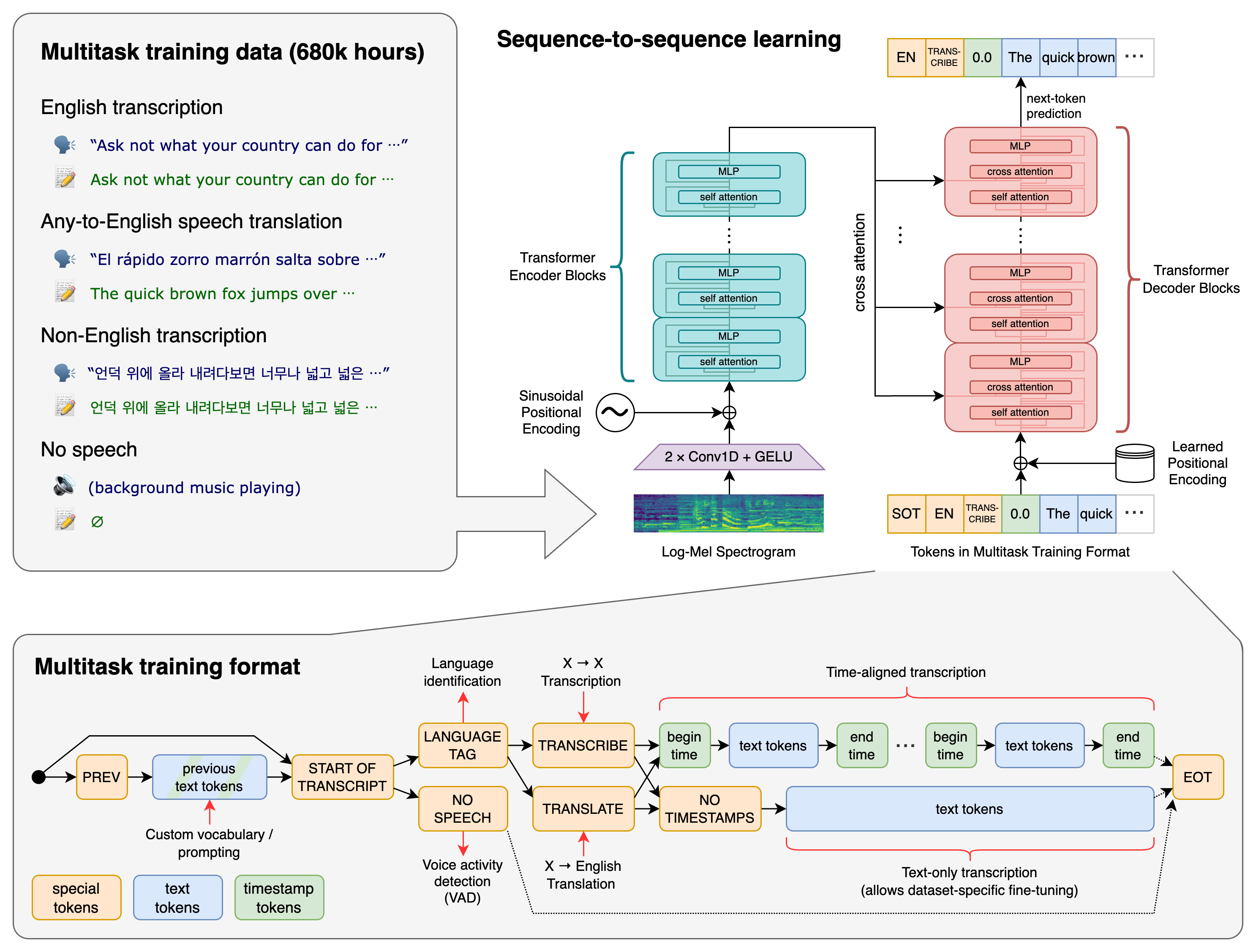
A Transformer sequence-to-sequence model is trained on various speech processing tasks, including multilingual speech recognition, speech translation, spoken language identification, and voice activity detection. These tasks are jointly represented as a sequence of tokens to be predicted by the decoder, allowing a single model to replace many stages of a traditional speech-processing pipeline. The multitask training format uses a set of special tokens that serve as task specifiers or classification targets.
## Setup
We used Python 3.9.9 and [PyTorch](https://pytorch.org/) 1.10.1 to train and test our models, but the codebase is expected to be compatible with Python 3.8-3.11 and recent PyTorch versions. The codebase also depends on a few Python packages, most notably [OpenAI's tiktoken](https://github.com/openai/tiktoken) for their fast tokenizer implementation. You can download and install (or update to) the latest release of Whisper with the following command:
pip install -U openai-whisper
Alternatively, the following command will pull and install the latest commit from this repository, along with its Python dependencies:
pip install git+https://github.com/openai/whisper.git
To update the package to the latest version of this repository, please run:
pip install --upgrade --no-deps --force-reinstall git+https://github.com/openai/whisper.git
It also requires the command-line tool [`ffmpeg`](https://ffmpeg.org/) to be installed on your system, which is available from most package managers:
```bash
# on Ubuntu or Debian
sudo apt update && sudo apt install ffmpeg
# on Arch Linux
sudo pacman -S ffmpeg
# on MacOS using Homebrew (https://brew.sh/)
brew install ffmpeg
# on Windows using Chocolatey (https://chocolatey.org/)
choco install ffmpeg
# on Windows using Scoop (https://scoop.sh/)
scoop install ffmpeg
```
You may need [`rust`](http://rust-lang.org) installed as well, in case [tiktoken](https://github.com/openai/tiktoken) does not provide a pre-built wheel for your platform. If you see installation errors during the `pip install` command above, please follow the [Getting started page](https://www.rust-lang.org/learn/get-started) to install Rust development environment. Additionally, you may need to configure the `PATH` environment variable, e.g. `export PATH="$HOME/.cargo/bin:$PATH"`. If the installation fails wi
阅读完整原文
商业机会分析 规则生成(AI 未配置)
将 whisper 改造为垂直场景 SaaS
| 产品构想 | 保留核心能力,针对某一类用户(如某行业团队)做托管版,收取月费。 |
| 目标用户 | 有该需求的中小团队 / 独立站长 |
| 难度/周期 | 较高 · 2~4 周(MVP) |
| 收费模式 | 订阅制(如 ¥29~99/月) |
| 竞争风险 | 需验证付费意愿;注意许可证合规 |
| 依据 | 数据支持的判断:许可证与关键词显示存在商用与付费场景 |
面向细分需求的二次开发产品
| 产品构想 | 基于 whisper 的核心能力,聚焦一个更窄的场景(如某平台、某行业)做差异化。 |
| 目标用户 | 该细分场景用户 |
| 难度/周期 | 中 · 2~6 周 |
| 收费模式 | 买断制 / 订阅制 / 广告 |
| 竞争风险 | 细分需求规模需验证 |
| 依据 | AI 推测:基于项目主题标签的判断 |
竞品与相似项目 GitHub Search 真实检索
| 项目 | 中文简介 | Stars | 语言 |
|---|---|---|---|
| jamiepine/voicebox | 中文介绍暂未生成 The open-source AI voice studio. Clone, dictate, create. |
60,401 | Python |
| ggml-org/whisper.cpp | 中文介绍暂未生成 Port of OpenAI's Whisper model in C/C++ |
55,078 | C++ |
| Zackriya-Solutions/meetily | 中文介绍暂未生成 Privacy-first AI meeting note taker for Windows and macOS. F |
32,607 | Rust |
| SYSTRAN/faster-whisper | 中文介绍暂未生成 Faster Whisper transcription with CTranslate2 |
26,656 | Python |
| m-bain/whisperX | 中文介绍暂未生成 WhisperX: Automatic Speech Recognition with Word-level Time |
25,203 | Python |
| chidiwilliams/buzz | 中文介绍暂未生成 Buzz transcribes and translates audio offline on your person |
22,612 | Python |
项目优势与风险
| 技术成熟度 | 创建于 2022-09-16,最近推送 2026-08-31,发布过 13 个 Release |
| 社区活跃 | Star 112,501 / Fork 13,638 / Issue 182(数据支持,可自行核实) |
| 许可证 | MIT |
| 主要风险 | 上游项目方向可能变化;同赛道竞争者较多(见竞品表);热度与需求不完全等价 |
安装与使用
git clone https://github.com/openai/whisper.git
cd whisper
# 请阅读仓库 README 获取确切安装步骤(依赖、配置、启动命令)