dotfiles
738
Stars
27
Forks
6
Watchers
—
Open Issues
待补全
许可证
Lua
语言
2024-06-29
创建时间
2026-11-12
最近更新
项目能做什么
该项目是作者个人的系统与软件配置文件集,使用 GNU Stow 进行跨系统(macOS / Linux)的软链接管理。核心涵盖 Alacritty、Fish、Kitty、Neovim、Tmux、VS Code 等主流开发工具的配置,并附带了 macOS 的 Brewfile 软件依赖清单。
来源:AI 基于仓库事实生成
· 内容以仓库实际 README 为准
使用说明 查看原始 README 原仓库文档
中文使用说明暂未生成。下面保留原仓库 README 摘录,命令与配置均以原文为准。
原始 README 摘录(英文原文,节选前 3000 字符)
# Dotfiles My personal configuration files, managed with [GNU Stow](https://www.gnu.org/software/stow/). Stow creates symlinks from each package in this repository into your home directory. > [!IMPORTANT] > My [old dotfiles](https://github.com/maxhu08/dotfiles-old) use a different setup and do not use Stow. ## Getting started Install Stow, clone this repository, and enter it: ```sh # macOS brew install stow # Arch Linux sudo pacman -S stow git clone https://github.com/maxhu08/dotfiles cd dotfiles ``` Stow will not overwrite existing, conflicting config files. Back up or move any existing files before stowing their packages. ## Stow configurations From the repository directory, stow the packages you want: ```sh stow alacritty fish kitty nvim picom tmux zed ``` VS Code stores its user configuration in different locations on Linux and macOS. From the repository directory, stow the package for your operating system: ```sh # macOS stow vscode-macos # Linux stow vscode-linux ``` > [!CAUTION] > Do not stow or symlink `git/`. Keep `~/.gitconfig` as a regular local file so account switches and other Git config changes do not modify this repository. `git/.gitconfig` contains only the Homebrew-compatible GitHub CLI credential helper; copy that section into your local config if needed, and configure your own name and email locally. > > `xorg/` is specific to my monitor setup and is not included in the example command above. ## Packages and wallpapers Stow only links configuration files; install the corresponding programs separately. For Arch package setup, see my [rebos-config](https://github.com/maxhu08/rebos-config-arch). On macOS, link the curated Brewfile to `~/.Brewfile` and install essentials from the repository directory: ```sh stow homebrew brew bundle install --file="$HOME/.Brewfile" --no-upgrade ``` Extra Homebrew apps can stay installed without being listed. Avoid `brew bundle cleanup` with this essentials-only file. Wallpapers are maintained separately in my [wallpapers repository](https://github.com/maxhu08/wallpapers). ## Star history [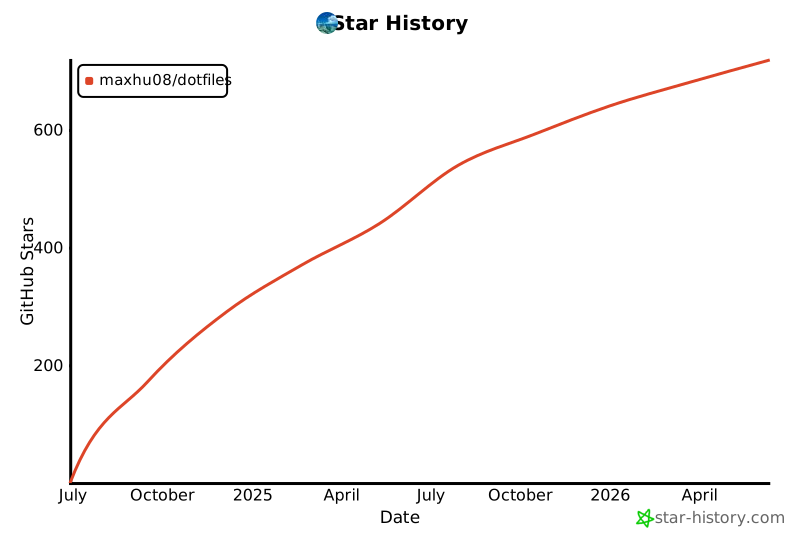](https://star-history.com/#maxhu08/dotfiles&Date)阅读完整原文
项目深度分析 AI 生成
开发者环境极速同步与管理 CLI (SaaS)
| 产品构想 | 受该仓库基于 GNU Stow 的管理方式启发,构建跨平台 CLI + 云端备份工具,提供冲突检测、密钥保护、自动化依赖包安装(如 Brewfile/Pacman 一键串联)及多机环境同步功能。 |
| 核心功能 | 配置云端安全备份(自动过滤私钥/凭据)、自动检测并解决软链接冲突、跨 macOS/Linux 的包依赖一键装配、环境版本回滚。 |
| 目标用户 | 多设备切换工作的独立开发者、远程办公团队、不熟悉 Stow 复杂符号链接逻辑的初级开发者。 |
| 难度/周期 | 中等 · 2-3 个月 · 成本:极低(主要是云端存储和认证服务的轻量成本) |
| 收费模式 | 免费版支持 1-2 台设备基础同步;增值订阅(Pro)提供团队环境模板共享、端到端加密、无限机器配置备份同步。 |
| 竞争风险 | 开源竞品极多(Chezmoi、yadm、Mackup 等全免费),商业转化壁垒极高,开发者普遍倾向免费自建。 |
| 依据 | AI推测 |
终端美学与生产力套件(内容/主题/预设包)
| 产品构想 | 基于作者在 Unixporn 社区积累的美学声誉(仓库获 700+ Star),将 Neovim 插件链、终端配色、字体、快捷键习惯打包为开箱即用的付费教程或高级环境方案(类似 LazyVim 定制发行版)。 |
| 核心功能 | 一键脚本部署脚本、精心调试的 LSP/DAP/Git 集成、视频教程、定期维护与兼容性更新支持、专属社区交流答疑。 |
| 目标用户 | 希望提升终端编码体验但缺乏时间折腾 Lua/Neovim 配置的专业开发者、前端/全栈工程师。 |
| 难度/周期 | 低 · 1 个月 · 成本:几乎为零(主要是时间与内容制作成本) |
| 收费模式 | 一次性买断付费(Gumroad/小报童等),提供售后支持群和配置版本更新订阅。 |
| 竞争风险 | 开源圈内 Neovim/终端方案高度透明且易被复制,售卖配置包容易引起社区反感,天花板较低。 |
| 依据 | AI推测 |
团队开发环境标准化分发平台 (Team Dotfiles/DevEx)
| 产品构想 | 将个人 dotfiles 思路企业化,解决新员工入职环境搭建耗时(Onboarding)问题,提供企业级可控的终端规范、IDE 配置和开发环境一键配置平台。 |
| 核心功能 | 团队统一工具链分发(IDE/Terminal/Git 规范)、内网源一键拉取、安全凭证自动隔离、合规性检测与审计面板。 |
| 目标用户 | 初创企业研发负责人(CTO)、中小型团队工程效率(DevEx)工程师。 |
| 难度/周期 | 高 · 3-6 个月 · 成本:中等(企业级功能开发、合规审查及销售支持) |
| 收费模式 | 按团队活跃开发人员席位按月/年订阅(SaaS)。 |
| 竞争风险 | 企业通常更倾向于采用远程容器化开发方案(Dev Containers、GitHub Codespaces、Gitpod),对本地 dotfiles 分发需求偏弱。 |
| 依据 | 尚需验证的假设 |
AI 基于仓库公开数据分析生成,含推测成分,不构成收益承诺。
报告会保存到 个人中心
竞品与相似项目 GitHub Search 真实检索
相似项目数据正在完善中,暂不展示(避免误导)
项目优势与风险
| 技术成熟度 | 创建于 2024-06-29,近 30 天仍在推送 |
| 社区活跃 | Star 738 / Fork 27 / Issue 0(数据支持,可自行核实) |
| 许可证 | 未检测到(需人工确认) |
| 主要风险 | 上游项目方向可能变化;同赛道竞争者较多(见竞品表);热度与需求不完全等价 |
安装与使用
此项目未提供 Docker 镜像,安装步骤以原仓库 README 为准(涉及依赖安装与环境配置,对新手门槛较高)。